Add a User
How you add a user depends on the type of subscription you have.
Firm-wide subscription
For firm-wide access products, no admin action is needed. A new colleague can simply sign in at https://www.patentbots.com/login with their work email and create a password (or login with SSO if your law firm or company uses SSO). They are automatically associated with your firm-wide subscription.
Individual/per-user subscription
Per-user products are licensed by the seat, so adding another person means adding a paid license — this is not a self-service action on the website. To add a user, contact support@patentbots.com and let us know who you'd like to add. We'll add the license and confirm the cost.
Remove a User
-
From the left sidebar, select the Admin page — or go directly to https://www.patentbots.com/subscription.
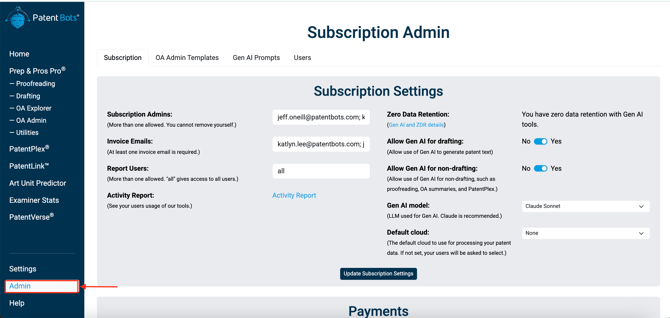
- Open the Users page
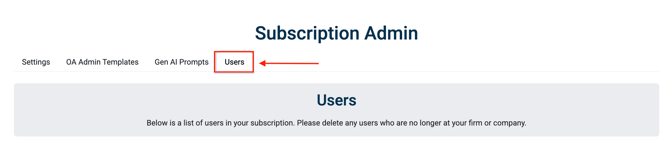
- Select the trash can icon in the row for the user you want to remove.
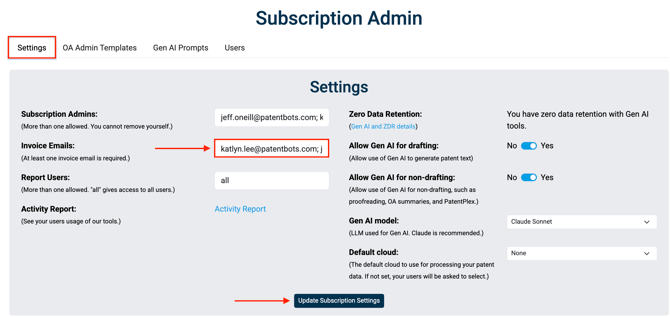
If the departing person is also a Subscription Admin, receives Invoice Emails, or has Activity Report access, also remove their email on the Settings tab
Add or change a Subscription Admin
- Select the Admin tab from the left sidebar.
- Add (or remove) the email address under Subscription Admins.
- Select Update Subscription Settings to save.
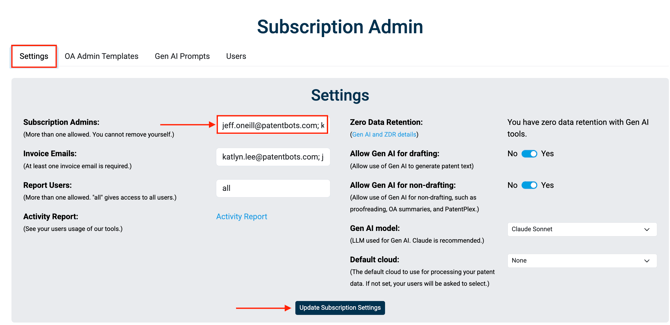
Admins can manage users, enable features (such as Gen AI), and access reports, so grant admin access only to people who should control the subscription.
Update the Billing Email
From within the Settings tab, you can also change the email(s) billing correspondence is sent to — add/remove emails under Invoice Emails field and make sure to save the changes by clicking on Update Subscription Settings.
Manage Activity Report Access
A Subscription Admin can view a 90-day Activity Report from the subscription page and also let other users access reports without making them an admin.
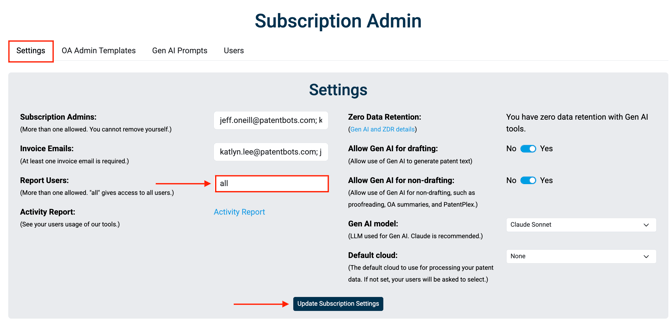
Report access is controlled by the Report Users role on the Settings tab — separate from Subscription Admins. To give someone access to Activity Reports (without granting full admin control):
-
Go to the Settings tab on the Subscription page.
-
Add their email address under Report Users. Put "all" if you want to give access to all users.
-
Select Update Subscription Settings to save.